Timesheet Report
The timesheet report is the most important report in the system for the timesheets. Payslips are generated from this report. The report is available as first menu entry in the menu Reports.
Layout
There are several tables in the report: one for each Resource, sorted by Resource surname and name. Only the Resources with 'Preferred in report' field set to 'Yes' are shown.
Example of table: 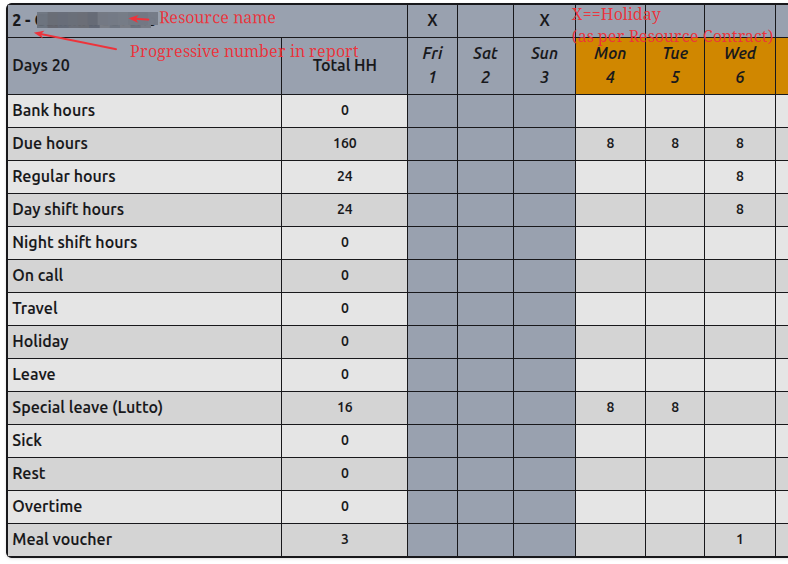
Each Resource table is organised as follows:
1st row: - A progressive number (in report) followed by the Resource surname and name. - An "X" denotes the corresponding day in the month (which is specified in row 2) is a holiday according to the Resource Contract Country Calendar.
2nd row: - Label "Days" followed by the number of the Resource Working Days (see Definitions) in the month. - Label "Total HH" (Total Hours) followed by the calendar days in the month. In this colum we will show the sum of the values in the columns 3 onwards.
Following rows (see Definitions): Bank hours, Due hours, Regular hours, Day shift hours, Night shift hours, On Call, Travel, Holiday, Leave, Sick, Rest, Overtime, Meal Voucher
Definitions
- Working Day: a day the Resource is expected to work according to its Working Schedule (see following Definition)
- Working Schedule: the number of hours the Resource is expected to work per week day (set in Resource Contract). Due Hours calculations may override this number in a calendar day.
- Bank hours: A positive number shows the number of bank hours the Resource consumed in the month. A negative number shows the number of bank hours the Resource produced in the month.
- Due hours: The number of hours the Resource is expected to work in the day (see Due Hours calculations).
- Regular hours: The number of hours (Day Shift + Night Shift + Travel Hours) the Resource worked in the day up to maximum the expected number of hours (Due Hours).
- Day shift hours: The number of hours the Resource worked in the day during the Day Shift.
- Night shift hours: The number of hours the Resource worked in the day during the Night Shift.
- On Call: The number of hours the Resource was on call in the day.
- Travel: The number of hours the Resource travelled in the day.
- Holiday: The number of hours (equivalent to the expected Due Hours) the Resource was on holiday in the day.
- Leave: The number of hours the Resource was on leave in the day.
- Sick: The number of hours (equivalent to the expected Due Hours) the Resource was sick in the day.
- Rest: The number of hours the Resource was on rest in the day.
- Meal Voucher: 1 if the meal voucher was earned by the Resource in the day (see Overtime Calculations).
- Overtime: The number of hours the Resource earned as overtime in the day (see Meal Voucher Calculations).
Rules
- A Resource cannot have concurrent Contracts
Calculations
Country Calendar
To determine if a day is a holiday for a Resource a Country Calendar Code can be set in the Contract. If no Country Calendar is set then the default Country Calendar set for the site is used.
Due Hours
In a calendar day:
- If the Resource has no Contract, OR the Resource is expected to be on holiday (according to the Country Calendar, not if the Resource requested a holiday for the day) then Due Hours = 0 (Sundays are considered as Holidays if flag Contract.sunday_as_holiday is True - which is the default).
Else
- The Due Hours value is defined in the Resource Contract Working Schedule if it is set, else it is as per the Default Working Schedule set for the site (typically 8 hours per day, Mon-Fri).
Overtime
The basic value for overtime is calculated as: Day shift hours + Night shift hours + Travel - Due Hours If such value is 0 or negative then the Overtime value is 0.
Meal Voucher
To earn a meal voucher, the Resource must work at least it Due hours multiplied by a "Meal Voucher Threshold" (set in the Resource Contract "Meal voucher" field or defaulting to the site default, generally 6 hours Mon-Fri).